Technical
Post-Hire
Skill-Gap
Pre-Hire
Surveys
Personality
Language
Culture
Skill
Domain
Cognitive
Behavioral
left arrow

Audio Proctoring Explained: Features, Types and Benefits

Proctoring
Author:
Pratisrutee Mishra
March 31, 2026
PMaps hiring guide download
Download Now

Oops! Something went wrong while submitting the form.
What is Audio Proctoring
Summarise this post with:

As online learning expands rapidly, audio proctoring is playing a key role in ensuring remote exams are honest. Today, 70% of organizations use remote proctoring technologies (Gartner). These tools help ensure digital assessments are secure, fair, and free of interruptions.

What Is Audio Proctoring?

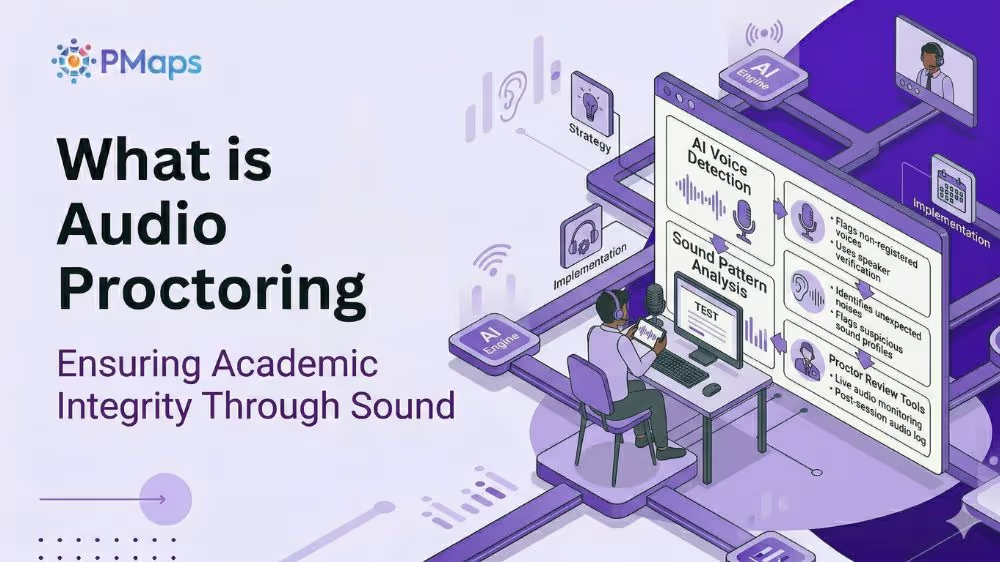
Audio proctoring helps keep online exams secure by listening for unusual sounds that might signal cheating. This approach helps maintain a quiet, controlled environment and supports the integrity of remote tests. Often used alongside video and screen-sharing, audio proctoring monitors exams in real time to ensure a fair and reliable process.

How Does Remote Audio Proctoring Work?

Remote audio proctoring captures and analyzes audio throughout online exams. This helps spot suspicious behavior and makes sure candidates follow the rules during remote tests.

  • Setup and Monitoring: The proctoring software requests access to the candidate’s microphone and listens to or records audio throughout the exam to help keep the session secure.
  •  AI and Live Monitoring: Advanced systems use both AI and live proctors to spot and flag sounds that are unusual for a test, helping to catch suspicious activity early.
  • Whispering: The system can detect quiet conversations or murmurs that might indicate someone is getting unauthorized help.
  • Multiple Voices: It can detect when more than one person is speaking, which could indicate that people are working together when they shouldn’t be.
  • Background Noise: The system flags sounds like paper rustling, outside voices, tapping, or typing, since these might mean someone is breaking the rules.
  • Security Measures: When unauthorized or unusual audio signals are detected (e.g., another person speaking), the system immediately alerts the proctor or flags the incident for closer review.
  • Environment Check: Before the exam begins, proctors may request an audio check of the room to ensure it is quiet, empty, and free of anything that could cause problems or facilitate cheating.

Key Audio Proctoring Features

Audio proctoring uses advanced security features to spot suspicious sounds, automate monitoring, and help supervisors oversee remote assessments with AI detection and streamlined proctoring tools.

  • Real-Time Audio Analysis & Monitoring: AI models listen to the test-taker’s environment through the microphone. They can tell the difference between regular background noise and sounds that might suggest cheating or outside help.
  • Suspicious Sound Detection: The system automatically flags unusual sounds, such as extra voices, whispering, muffled conversations, device clicks, or speech that does not match normal test conditions.
  • Keyword Spotting: Advanced AI algorithms can detect certain spoken words, such as “answer,” “Google,” “search,” or “calculator.” These words may suggest someone is trying to look up answers or get outside help during the exam.
  • Security Benefits: Helps prevent impersonation and verbal coaching, protecting the integrity of important assessments.
  • Voice Recognition & Biometrics: Some proctoring platforms use voiceprints to verify candidate identity. This ensures that the person speaking matches the registered test-taker, minimizing the risk of impersonation in remote assessments.
  • Automated Flagging & Incident Reporting: If the software hears something suspicious, it immediately sends an alert, saves the audio clip, and creates a report with the time for human proctors or compliance teams to review.
  • Voice Command Detection: The system can recognize when someone uses voice commands for digital assistants, like “Hey Siri,” “Alexa,” or “OK Google.” This may show an attempt to get unauthorized help.
  • Contextual Audio Analysis: Modern AI helps avoid false alarms by distinguishing between harmless background sounds, such as traffic, birds, or appliances, and noises made intentionally by people. This keeps the test fair without disturbing honest test-takers.

Types of Audio Proctoring

Audio proctoring uses either live or automated systems. Each option provides different levels of real-time monitoring, identity checks, and post-exam review to help keep remote exams fair and secure.

1. Live Audio Monitoring

With live audio monitoring, a human proctor listens during the exam, often alongside video. This setup lets the proctor step in right away if they hear anything suspicious and keeps the exam under constant supervision.

2. Recorded/Automated Audio Monitoring

Automated audio monitoring records the exam and uses AI to spot unusual sounds. It flags anything suspicious and generates reports for later review, allowing exams to be secured without anyone listening live.

Benefits of Remote Audio Proctoring

Remote audio proctoring helps keep exams fair by listening for unusual sounds that video monitoring might miss. It can pick up on small details, send real-time alerts, and improve security for online tests.

1. Monitoring the Testing Environment

Audio proctoring listens for unusual sounds or conversations that might suggest cheating. This helps keep the remote testing environment secure, especially when outside communication is not allowed.

2. Real-Time Audio Surveillance

With real-time audio surveillance, supervisors can listen in during remote exams. This lets them step in right away and get alerts if they notice anything suspicious or hear communication that is not allowed.

3. Integration with Other Proctoring Tools

Audio proctoring works well with video monitoring and screen-sharing tools. Together, they form a strong proctoring system that helps protect exam integrity and provides better oversight during remote tests.

How Audio Proctoring Compares to Other Proctoring Methods

Audio proctoring works alongside other online proctoring tools by detecting sounds that visual tools might miss. It helps make remote exams more secure by adding a layer that focuses on catching cheating through communication.

1. Audio vs Video Proctoring

Audio and video proctoring each monitor different things. Audio picks up on sounds, while video watches for movements. Using both helps catch more types of cheating during remote exams.

2. Audio Proctoring vs Human Proctors

Audio proctoring and human proctors work well together. Automated audio tools offer steady, unbiased monitoring. Human proctors bring judgment, context, and quick decision-making when they review what happens during exams.

Conclusion

Audio proctoring helps keep remote assessments secure by detecting audio-based issues that traditional monitoring might miss. Its features make online exams safer, fairer, and easier to manage at scale. If you need help getting started, reach out to PMaps at 8591320212 or assessment@pmaps.in.

Frequently Asked Questions

Learn more about this blog through the commonly asked questions:

Q1: How reliable is audio proctoring compared to video-only monitoring?

Recruiters often point out that audio proctoring can catch whispering, coaching, and background conversations that video alone might miss. This adds an extra layer of protection against communication-based cheating during remote exams.

Q2: Does audio proctoring invade candidate privacy?

HR professionals often mention that today’s audio proctoring tools use consent-based activation, encryption, and clear data policies. Candidates know what is being recorded, so the process is both compliant and transparent.

Q3: Can audio proctoring fully replace live human proctors?

Most experts agree that audio proctoring cannot fully replace human oversight, but it does reduce manual work. Audio tools offer constant, unbiased monitoring, while human proctors use their judgment to review flagged events.

Q4: What happens if there is background noise during an exam?

People often ask if background noise will cause problems. Audio proctoring tools flag unusual or repeated sounds, but they do not automatically fail candidates. Proctors review the recordings to decide if the noise suggests misconduct.

Q5: Is audio proctoring suitable for high-stakes certification exams?

Yes, L&D experts widely recommend audio proctoring for certification exams. It helps prevent verbal coaching, impersonation, and unauthorized communication, making these exams more secure for professional licensing and credentials.

Resources Related To Test

Related Assessments

Listening Skills Assessment Test

time
30 mins
type bar
Entry Level
Popular

Measures active listening, comprehension, and response appropriateness in communication.

English Language Assessment

time
59 Mins
type bar
Entry Level
Popular

Assess grammar, comprehension, and fluency with this online English language assessment for hiring.

Voice and Accent Assessment Test

time
59 min
type bar
All
Featured

Measures pronunciation, accent clarity, and communication effectiveness for customer-facing roles.

Communications Manager Test

time
58 mins
type bar
Middle Level
Popular

Assesses communication systems management and supervisory skills for optimal performance.

Subscribe to the best newsletter. Ever.

Your email is only to send you the good stuff. We won't spam or sell your data.

Thank you! Your submission has been received!
Oops! Something went wrong while submitting the form.
Get a callback
Purple circular button with a white 'X' symbol in the center indicating close or cancel.

Get a Callback

Need support? Fill out the form and we'll get back to you shortly.

Get a Callback

Need support? Fill out the form and we'll get back to you shortly.

Valid number

Thank you!

Thank you! Your submission has been received!
You can check submitted datas from "Project Settings".
Oops! Something went wrong while submitting the form.
✓ Valid number