.webp)
.webp)


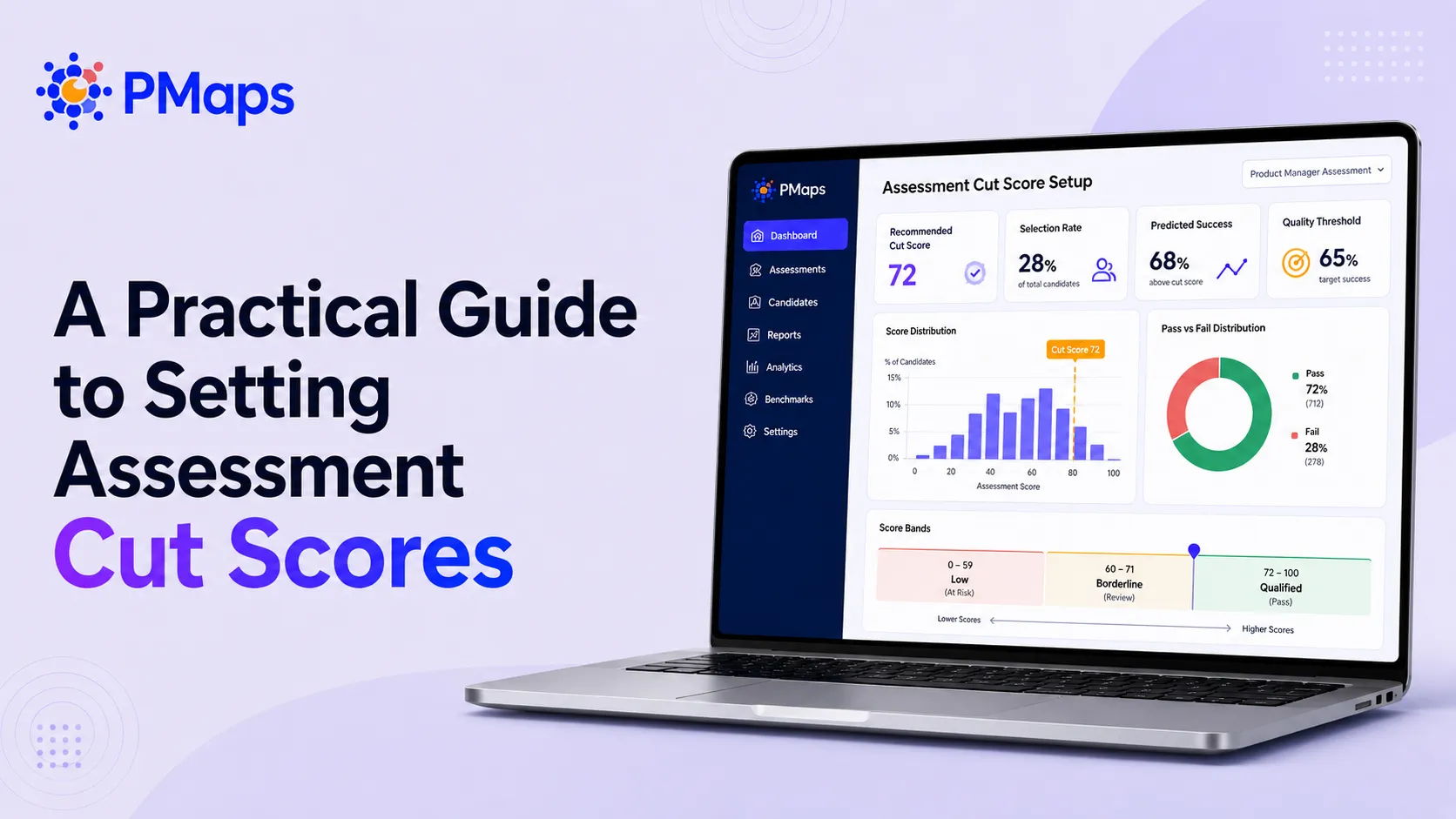
The cut-score is the single most consequential number in your hiring funnel. It's the line that turns an assessment result into a yes or a no — and yet most teams set it on a round number nobody can defend, often inherited from a vendor years ago. Set it too high and you reject good candidates and starve the funnel. Set it too low and the assessment stops filtering at all.
A defensible cut-score is anchored to evidence: what actually separates your high performers from your low ones. This guide explains what a cut-score is, the main methods for setting one, a step-by-step approach to an outcome-anchored threshold, and the fairness checks that keep it sound.
In short: To set a cut-score, first validate the assessment against a real business outcome so you know which competencies predict performance. Then look at the score distribution of your proven high performers, set the passing bar where it best separates them from low performers, and adjust for your selection ratio (how many you need to hire vs. how many apply). Pilot it, monitor for adverse impact, and recalibrate each hiring cycle.
What a cut-score is — and isn't
A cut-score (or cut-off score, passing score) is the minimum result a candidate must reach to advance. It isn't the same as a raw score or a percentage correct; it's a decision threshold you choose, deliberately, based on what the score is supposed to predict.
The trap most teams fall into is inheriting one. A legacy "pass at 45%" gets copied from cycle to cycle until nobody remembers where it came from or whether it ever tracked performance. When PMaps validated a tele-sales assessment for a leading BFSI lender, the legacy cut sat at 45% — but the validated construct averaged 58% across the cohort, and the real signal lived in two specific competencies. The inherited number was both too low and pointed at the wrong things.
Four ways to set a cut-score
In practice you combine them: anchor on outcomes where you have data, and use selection ratio to tune the bar to your funnel.
Step-by-step: setting an outcome-anchored cut-score
1. Validate the assessment first
You can't set an evidence-based cut-score on an assessment you haven't validated. Establish the link between scores and a real business outcome before you draw any line. (See how to validate a hiring assessment.)
2. Weight the score on what predicts
Build the composite the cut-score sits on from the competencies that actually discriminate, weighted by how much they predict — not equal weighting across every section. In the BFSI study, two competencies carried 84% of the predictive weight; the cut-score should rest primarily on those. (See why assessments shouldn't be equally weighted.)
3. Look at the high-performer score distribution
Plot where your proven high performers actually scored. The cut-score lives in the region that best separates them from low performers — high enough to filter out likely low performers, not so high it rejects proven good ones. Calibrate the threshold to that distribution rather than to a round number.
4. Adjust for your selection ratio
A cut-score is not set in a vacuum — it has to clear your headcount. If you need many hires from a thin funnel, an aggressive bar leaves seats empty; if applicants are plentiful, you can raise it to concentrate quality. Set the threshold where validity and volume meet.
5. Pilot, monitor, and recalibrate
Run the cut-score on a pilot cohort before full rollout. Watch high-performer yield, funnel volume, and fairness (below). Then re-check it each hiring cycle — as the role and market shift, the right line shifts with them.
Don't forget fairness
A cut-score is a gate, so it carries fairness obligations. Monitor for adverse impact — meaningfully different pass rates across protected groups — and investigate any gap before it becomes a pattern. A higher cut-score isn't automatically a better one if it screens out qualified people from a particular group without a performance justification. Document the validation evidence behind your threshold; it's both good practice and your defense if the gate is ever questioned. This is operational guidance, not legal advice — loop in your compliance team for jurisdiction-specific requirements.
Common cut-score mistakes
- Inheriting a legacy number. "We've always passed at 45%" is not a justification. Re-anchor it to evidence.
- One cut-score for every section. Gate on the competencies that predict; treat low-signal sections as developmental, not pass/fail.
- Setting it once. A static cut-score drifts out of alignment as the role changes.
- Ignoring selection ratio. A statistically clean bar that empties your funnel isn't usable.
- Skipping fairness checks. A cut-score with no adverse-impact monitoring is a risk you can't see.
How PMaps helps
PMaps is an AI-powered talent assessment platform that helps enterprises improve their hiring odds — scientifically. Because PMaps scores are validated against real performance, cut-scores rest on evidence — set on the competencies that predict, calibrated to your high-performer distribution, and refreshed each cycle.
Want defensible cut-scores for your priority roles? Book a 30-minute walkthrough and we'll calibrate the gate to your data.